RestoreGo - Photo, Files
- 4.7
- Rating
- 1.00M
- Installs
- Free
- Price

 Analysis by App-foxy
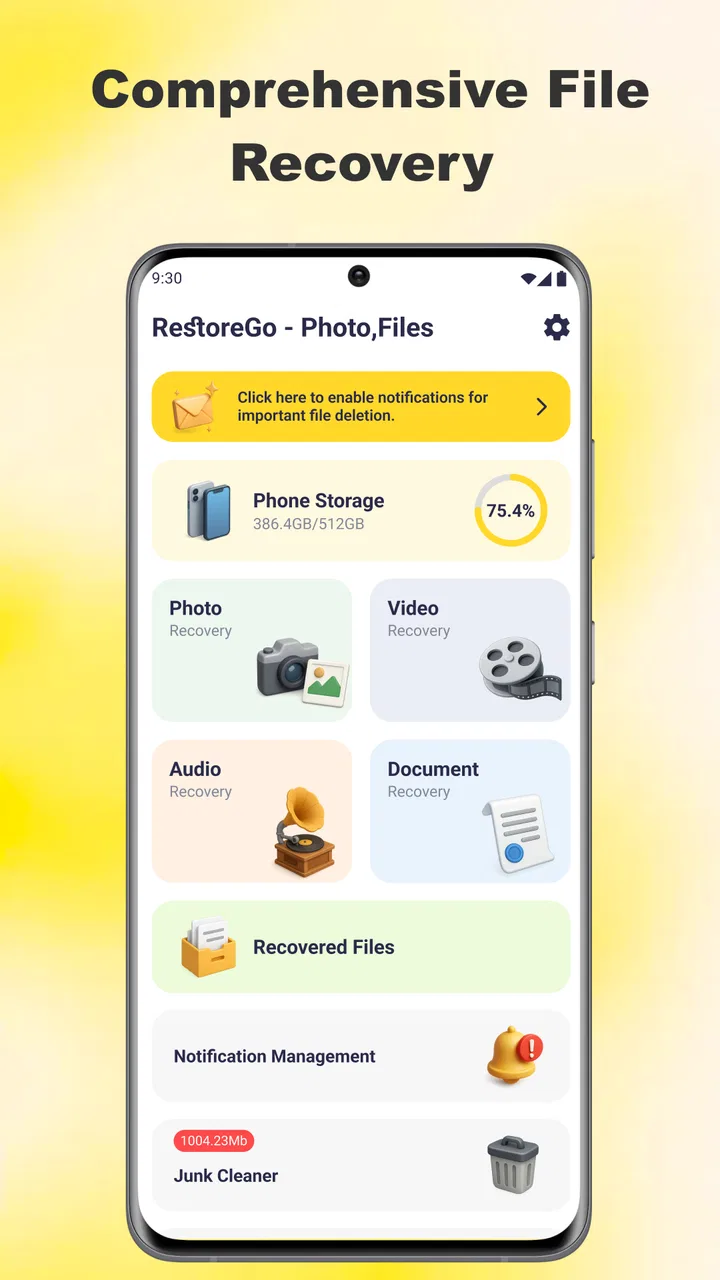
Deleting the wrong photo is one of those small mistakes that can ruin an otherwise ordinary day. It might happen while clearing storage, sorting a crowded gallery, or trying to remove one blurry image beside a dozen important ones. The real problem is not only losing the file; it is the time spent searching for a way to bring it back. RestoreGo - Photo, Files is built around that recovery moment, giving Android users a focused tool for trying to restore deleted photos, videos, and other files.
I reviewed it as a practical utility rather than as an app I would open every day for entertainment. Its value depends on how quickly it helps after an accidental deletion and how clearly it lets me identify the right result. That makes the app’s usefulness very situational, but in the right situation it can be far more convenient than searching through complicated recovery software or immediately connecting a phone to a computer.
Developed by WAKStudios, RestoreGo sits in the tools category and is free to use. It is rated for Everyone, so its purpose is easy to understand for a broad range of users. The app has a 4.7 average from around 5K ratings and has passed 1M+ installs, which suggests that its simple recovery purpose has connected with a substantial Android audience. The current version is 1.0.2, and it runs on Android 7.0 or later.
You May Also Like

 Blood Strike: 2.5 Anniversary
Blood Strike’s Loadouts Turn Every Drop Into a Tactical Gamble
A close look at Blood Strike’s custom loadouts: how fast access to signature weapons reshapes its battle royale rhythm, rewards preparation, and narrows the gap between fights.

 Pandora - Music & Podcasts
Pandora’s Music Is Easy to Start, but Harder to Recover
Pandora’s strength is its low-effort path from a seed to a station. Its weak spot is how much confidence it asks you to place in connection, setup, and quiet recovery.

 8 Ball Pool
 Is Built on Rivalries, Rematches, and Routine
A close look at the rivalries, rematches, shared routines, and unanswered safety questions that turn a quick pool match into a persistent mobile community.

 Samsung Music
’s Quiet Strength Is Playing What You Already Own
Its reach comes less from spectacle than from dependable access to a personal library. That simplicity is both the app’s strongest retention engine and its ceiling.

 AccuWeather: Weather Radar
AccuWeather Review: A Quick, Clear Forecast for Everyday Decisions
For everyday plans, the best forecast is the one you can understand quickly. AccuWeather makes rain timing, radar, and local conditions easy to act on, with a few trade-offs.

 Hill Climb Racing
Why Hill Climb Racing Still Turns Crashes Into One More Run
A tiny car, a bumpy hill and one more upgrade: Hill Climb Racing keeps resurfacing because its simple chaos makes every near-miss feel personal.
More From Our News Desk



Recovering a lost file without turning it into a project
I look at recovery tools as a way to make a stressful mistake manageable, not as a promise that every file can be brought back. This section focuses on the moment just after a deletion, when a calm, selective approach can save time and avoid making the search harder.
The recurring problem is usually a rushed tap
Most people do not plan to need a recovery app. The usual trigger is a rushed cleanup: I select several screenshots, remove them, and only afterward notice that an important image was included. Another common case is deleting a video to free space and realizing later that it was the only copy still on the phone. Files can also disappear when I reorganize folders and lose track of where something went.
RestoreGo is aimed at that specific kind of stress. Rather than presenting itself as a general file manager, it focuses on locating recently removed personal content and giving me a chance to recover it. That narrow purpose is a strength because I do not have to learn a large storage-management system before dealing with an urgent mistake.
Still, recovery is never something I would treat as guaranteed. The sooner I use the app after noticing a deletion, the better my chances are likely to be. Continued use of the phone can create new files, downloads, cached content, and camera data, making the search more crowded and potentially affecting what remains available. My first practical recommendation is simple: stop unnecessary cleanup, avoid taking replacement photos, and try the recovery process before doing anything else.
The first useful setup is a quick, careful scan
My first use of RestoreGo would be after an accidental deletion, not as a background tool I leave open. I would launch it, begin with the most relevant recovery option, and allow the app to inspect the device as requested. The important part is to stay patient while results appear. A recovery screen can contain duplicates, thumbnails, old downloads, or files with unclear names, so rushing through it can create a second mistake.
The app’s straightforward purpose makes the initial learning curve manageable. I do not need to understand technical recovery terminology to begin. The practical workflow is to scan, review the results, identify the original item by its preview or file details, and restore only what I recognize. That last step matters. I would not select everything simply because the app found it; broad recovery can leave me with a new pile of files to sort through.
A useful habit is to compare visual clues rather than relying only on filenames. Camera images often have names that are difficult to remember, while a preview can immediately show whether the result is the photo I need. For documents or less obvious files, I would check the extension, approximate size, and surrounding context before restoring. This is one of the less obvious trade-offs of a tool like this: the app can reduce technical effort, but it cannot remove the need for human verification.
What I would do in an everyday emergency
Imagine taking family photos during a short trip and later clearing several poor shots from the gallery. While making the selection, I accidentally remove a group image. I would not continue editing the gallery or install several unrelated utilities. I would open RestoreGo, scan for the deleted media, and look for the image using its preview. Once I found the correct result, I would restore it and immediately check the destination where recovered files appear.
That final check is easy to overlook. Recovery is not complete just because a button reports success. I would open the gallery or file browser, confirm that the restored item is readable, and, if it matters, copy it to another safe location. A recovered photo that exists only in one place is still vulnerable to another accidental deletion or a device problem.
The same workflow applies to a deleted video, but videos deserve extra patience because they can take longer to inspect and may be harder to distinguish from similar clips. For a work document, I would use the filename and file type as well as any preview. If the file is important enough to affect a deadline, I would treat RestoreGo as a first attempt at recovery rather than my only backup strategy.
Where the app removes friction
The biggest convenience is having a phone-based option ready when the mistake happens on the phone. I do not have to move immediately to a desktop, search for specialist software, or connect cables while trying to remember what was deleted. For casual photos, short videos, and ordinary files, that lower barrier can save more time than a technically deeper solution that takes longer to configure.
RestoreGo also keeps the emotional part of the problem under control. When I lose a personal image, I want a clear next step, not a long list of unfamiliar settings. A focused recovery utility gives me somewhere to start. That does not make every recovery successful, but it can prevent the common reaction of repeatedly searching the gallery, emptying more folders, or installing several apps without a plan.
Another practical advantage is that the app covers more than one content type. Someone looking for a missing photo may also discover that a video or general file needs attention. Having those recovery needs together is more convenient than using a separate tool for each format. I would still inspect the results carefully because a wider search can produce more irrelevant items than a photo-only search.
The time-saving habit is to recover selectively, verify immediately, and create a second copy afterward. RestoreGo can help with the first part, but the verification and backup decisions remain mine. That division of responsibility is important: no recovery app should encourage me to assume that every deleted item can always be brought back.
How it compares with the usual alternatives
The first alternative is the phone’s own trash or recently deleted area, when the device or gallery provides one. That option is often the simplest place to look because it may preserve the original organization and require less searching. I would check it before using RestoreGo. The advantage of RestoreGo is that it gives me another recovery route when the normal gallery path is not enough or when I need a broader look across stored content.
The second alternative is a cloud backup. A backup service can be better for important photos because it protects against more than accidental deletion, including some device-related problems. However, it depends on the file having been uploaded and retained. If synchronization was disabled, delayed, or incomplete, a recovery utility on the phone may be the more immediate option. I see RestoreGo and backups as complementary rather than interchangeable.
Desktop recovery programs are the more serious alternative for difficult cases. They may offer deeper controls or more detailed inspection, but they also introduce setup time, computer access, and a more technical workflow. I would choose that route for valuable files that RestoreGo cannot locate, especially when the phone has experienced broader storage trouble. For a single accidentally deleted picture, the desktop approach can be excessive.
Manual file browsing is useful when a file was moved rather than deleted. Before scanning, I would search common folders and check the gallery’s deleted area. RestoreGo is not a replacement for understanding where files normally live. Its value begins when ordinary searching does not find the item and I need a recovery-focused attempt.
Small workflow choices that improve the result
One useful technique is to narrow my mental search before opening the results. I would remember whether the item came from the camera, a messaging app, a download, or a document folder. That context helps me recognize the right result and avoid restoring unrelated files. It also makes the review stage less tiring when the scan returns many possibilities.
I would also recover one or two confirmed items first instead of selecting a large group. This lets me check whether the restored files open correctly and whether they appear where I expect. If the first result is valid, I can continue with more confidence. If it is not, I have learned something before creating a larger cleanup task.
For a crowded phone, I would perform the scan before downloading new media or recording more video. This is not a guarantee of success, but it is a sensible way to reduce additional storage activity while I am trying to locate something recently removed. Afterward, I would remove unwanted recovered copies rather than leaving every result in place.
There is also a privacy-minded workflow. I would avoid restoring sensitive material merely because it appears in the results, and I would review the destination folder after recovery. A forgotten recovered document can remain visible in a general gallery or file list. The app helps retrieve content, but I still need to manage what stays on the device.
Where RestoreGo is not the right choice
I would not choose RestoreGo as a substitute for regular backups. If a photo is irreplaceable, relying on deletion recovery alone is a weak plan. A second copy in a trusted location protects against situations where the original storage is damaged, the phone is lost, or the file is no longer recoverable through an on-device scan.
I would also look elsewhere when the missing item is part of a serious data-loss incident. A phone that has been reset, physically damaged, encrypted in a way that prevents access, or affected by a broader storage failure may require professional or desktop-level options. A simple mobile utility is most appealing for ordinary accidental deletion, not for every possible form of digital loss.
Users who only need to restore items already visible in a gallery’s deleted folder may find the built-in option faster. Likewise, someone who mainly wants automatic organization, duplicate removal, or cloud synchronization should use a tool designed for those jobs. RestoreGo is focused, and that focus means it should not be judged as a complete storage-management suite.
My final view after weighing the convenience
RestoreGo - Photo, Files makes sense as a practical first response to accidental deletion. I like that its purpose is immediately understandable and that it brings photo, video, and file recovery into one phone-based workflow. The free price removes the hesitation of trying it when the mistake has just happened, while the Everyone rating makes it approachable for ordinary household use.
Its strongest benefit is not a promise of perfect recovery; it is the reduction of time and friction between noticing a mistake and making a sensible recovery attempt. The app can be especially useful for people who regularly clear gallery clutter, handle family media, or keep important documents on an Android phone without wanting to learn desktop recovery tools.
My balanced recommendation is to install it as a backup option, but not to treat it as insurance. Check the built-in deleted folder first, stop unnecessary phone activity, scan promptly, identify files carefully, and verify every restored item. If the file is critical or the storage problem is severe, move to a proper backup or specialist recovery approach.
For the everyday case of one wrong tap, RestoreGo is a reasonable tool to have available. It does not remove every uncertainty surrounding deleted data, and it still requires careful judgment during selection. Even so, its focused design and accessible workflow make it a useful addition for Android users who want a quick recovery attempt without turning a simple mistake into a technical project.
In my experience, that is the right way to think about RestoreGo: not as a guarantee, but as a convenient first move when a photo, video, or file disappears unexpectedly. If saving time matters more than having advanced desktop controls, it is worth keeping in mind. If dependable long-term protection matters most, pair it with a real backup routine rather than relying on recovery after the fact.
FAQs for RestoreGo - Photo, Files
01What is RestoreGo - Photo, Files used for?
RestoreGo - Photo, Files is designed to help users look for deleted or missing content on an Android device, including photos and other personal files. Its usefulness depends on how the files were removed, whether they have been overwritten, and what access permissions the app receives. It should be viewed as a recovery tool, not a guarantee that every deleted file can be restored.
02Can RestoreGo recover every deleted photo or file?
No recovery application can promise to restore every deleted item. Success is more likely when the deletion happened recently and the device has not reused the storage space. Continued use of the phone, downloading new files, or installing many applications can overwrite recoverable data. For the best chance of recovery, stop using the affected storage as soon as possible and scan it promptly.
03Does RestoreGo - Photo, Files require special permissions or root access?
The app may request access to photos, media, files, or device storage so it can search for content and save recovered items. The exact permissions can vary by Android version and device manufacturer. Some recovery functions may be limited without advanced system access, while rooting a phone can create security, warranty, and data-loss risks. Review every permission request before continuing.
04Is RestoreGo - Photo, Files free to use?
RestoreGo may provide some recovery features at no cost while placing additional tools, deeper scans, or recovery limits behind in-app purchases or a subscription. Pricing and available features can change, so check the current Google Play listing and the payment screen before confirming anything. Also verify whether a trial automatically renews and understand the cancellation terms.
05Is it safe to use RestoreGo for private photos and documents?
Recovery apps handle sensitive personal content, so privacy should be considered before scanning. Download RestoreGo only from a trusted official store, check its developer information and privacy policy, and grant the minimum permissions required. Avoid sharing recovered files through unknown services. If the app offers cloud backup or online processing, confirm where data is sent and how long it is retained.
Pros
- Recovers photos
- videos
- and documents from internal storage.
- Simple interface makes file scanning easy for less technical users.
- Preview options help identify files before attempting recovery.
- Can be useful after accidental deletion or formatting.
- Supports organizing recovered files into a separate location.
Cons
- Recovery success depends heavily on how long ago files were deleted.
- Deep scans may take time and use considerable battery power.
- Some features or exports may require an in-app purchase.
- Recovered files may have altered names or incomplete metadata.
- Results can include duplicates and unrelated cached files.

RestoreGo - Photo, Files
Gallery